


Let us start with the Start menu :
Press the windows logo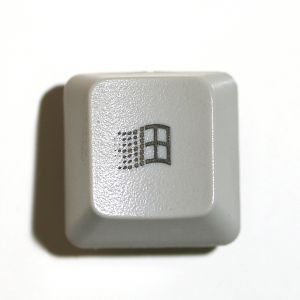 on your keyboard to access the start menu in a hassle free way.
Windows Explorer :
press+ E to easily access the windows explorer in no time.
Search file and folders :
+ F
Desktop :
+ D to minimize all the running programs and to see the desktop.
Task manager :
press + shift + Esc on your key to access the task manager in a more fastest way than the good old Ctrl + Alt + Delete shortcut.
Help ! ! :
+ F1 to open Windows Help window.
system properties :
press + Break button on you keyboard to open system properties window, where you can see the
complete configuration of your computer.
Minimize :
press+ M to minimize all the open window. and press shift + + M to undo minimize.
The above said short cuts will definitely reduce considerable part of your work time. For more shortcuts , tips and tricks Bookmark the blog or subscribe to RSS .
check out the blog daily for updates ! !
Press the windows logo
on your keyboard to access the start menu in a hassle free way.Windows Explorer :
press
+ E to easily access the windows explorer in no time.Search file and folders :
+ FDesktop :
+ D to minimize all the running programs and to see the desktop.Task manager :
press
+ shift + Esc on your key to access the task manager in a more fastest way than the good old Ctrl + Alt + Delete shortcut.Help ! ! :
+ F1 to open Windows Help window.system properties :
press
+ Break button on you keyboard to open system properties window, where you can see thecomplete configuration of your computer.
Minimize :
press
+ M to minimize all the open window. and press shift + + M to undo minimize.The above said short cuts will definitely reduce considerable part of your work time. For more shortcuts , tips and tricks Bookmark the blog or subscribe to RSS .
check out the blog daily for updates ! !
Most Viewed Posts:
1.Track your friends exact location using his/her phone number


